Increase in profitability up to 20-25% due to reduced consumption compared to stock firmware.
You can view the operating modes at the following links : X21 series, X19 series, L9/L7 series
Hashrate Increase of Up to 20%
VNISH enables a significant hashrate boost through its intelligent auto-tuning system. The firmware works with each individual element of the hash board, analyzes chip characteristics, and selects optimal voltage and frequency settings for every chip. This per-chip optimization delivers higher performance without compromising stability.
In addition, VNISH offers dedicated overclocking profiles that users can activate based on their current goals. When maximum computational speed is required, the appropriate profile can be enabled, instantly switching the miner into high-hashrate mode. This feature is particularly valuable during periods of high BTC prices, when every additional terahash can generate noticeably higher profits.
Automatic Chip Tuning
Not all chips are created equal. Even within the same hash board, chip behavior can vary: some operate reliably at high frequencies, while others remain stable only at moderate levels. Stock firmware applies uniform settings to all chips, which leads to inefficient performance.
VNISH evaluates the condition of each individual chip and dynamically applies the most suitable parameters. This approach allows users to:
Increase overall hashrate
Reduce power consumption
Prevent overheating of individual modules
The auto-tuning system runs continuously in the background, constantly adjusting parameters to maintain peak performance under changing conditions.
Safety System
VNISH includes built-in, multi-layer safety mechanisms designed to ensure stable and secure miner operation in a wide range of environments. If hardware temperatures exceed safe limits, the firmware automatically shuts down the device to prevent overheating and potential damage to chips or power boards.
The system also provides protection against incorrect voltage levels: if power input exceeds safe thresholds, operation is immediately blocked and the issue is reported. Together, these safeguards allow users to experiment with different profiles and operating modes without risking hardware damage, as all critical scenarios are monitored and promptly handled by the firmware.
Temperature Management
Overheating is one of the primary causes of ASIC failure. Excessive temperatures accelerate chip degradation and can lead to damage of power boards and cooling fans.
VNISH firmware offers flexible cooling control, allowing users to adjust fan speeds and define minimum and maximum values based on miner temperature. This ensures an optimal balance between cooling efficiency, noise levels, and energy consumption.
In colder climates, fan speeds can be reduced to save power, while in hot regions the system automatically increases cooling intensity to prevent overheating. As a result, the equipment operates more reliably, efficiently, and with a longer service life.
Power Consumption Optimization
One of the most critical metrics in mining is the balance between energy usage and performance, measured in watts per terahash (W/TH). Reducing this value even by a few percent can result in substantial cost savings at the farm level. When hardware operates without optimization, every extra watt is multiplied across hundreds or thousands of units, quickly turning operating expenses into a serious issue.
VNISH firmware allows users to fine-tune chip voltage, balance workloads, and achieve more efficient W/TH values. This level of control makes it possible to significantly lower energy costs while maintaining stable performance.
Electricity prices also vary widely by region. In some countries, mining is only profitable when power consumption is reduced. ASIC firmware optimization ensures stable operation even under challenging conditions. For example, if a stock profile runs at 30 W/TH and an optimized profile reaches 25 W/TH, the annual cost difference for a single farm can amount to tens of thousands of dollars.
Error Reduction
ASIC devices are complex systems where every component plays a vital role in maintaining stable and efficient operation. Failures can occur for many reasons, including voltage fluctuations, overheating, incorrect cable connections, or clogged cooling systems.
With proper firmware configuration, ASIC miners can detect issues at an early stage. For instance, if a specific chip begins to behave unstably, the firmware can lower its operating frequency to prevent a complete hash board shutdown.
The logging system provides users with full visibility into errors and events, enabling fast response and informed decision-making—whether technical intervention is required or a software adjustment is sufficient. As a result, the risk of damage to expensive hardware components is minimized.
Send us the following information:
- Your pool stratum and your worker.
- List of models and types.
- Percentage you want to take from the total hashrate. (if required).
- Your logo (320×160 PNG, transparent background) or we can use vnish standard logo.
Installing the firmware is possible without SD card directly to NAND of the miner using the VNISH HASHCORE TOOLKIT .
To fix the DevFee offline error, you need to update the firmware to the latest version.
Download VOU (Updater software) and update your miners to the latest version automatically:
For Windows: https://vnish.us/files/tools/vou_win.zip
For Android: https://vnish.us/files/tools/vou_android.apk
For macOS: https://vnish.us/files/tools/vou_mac.zip
Link to all firmware: https://vnish.us/self-installation/
IF YOU STILL HAVE A PROBLEM AFTER THE UPDATE:
Install Google DNS on your miner.
To install and change the miner’s DNS, In the left menu:
System -> Network -> Disable DHCP.
DNS 1 : 8.8.8.8
DNS 2 : 8.8.4.4
Save and reboot
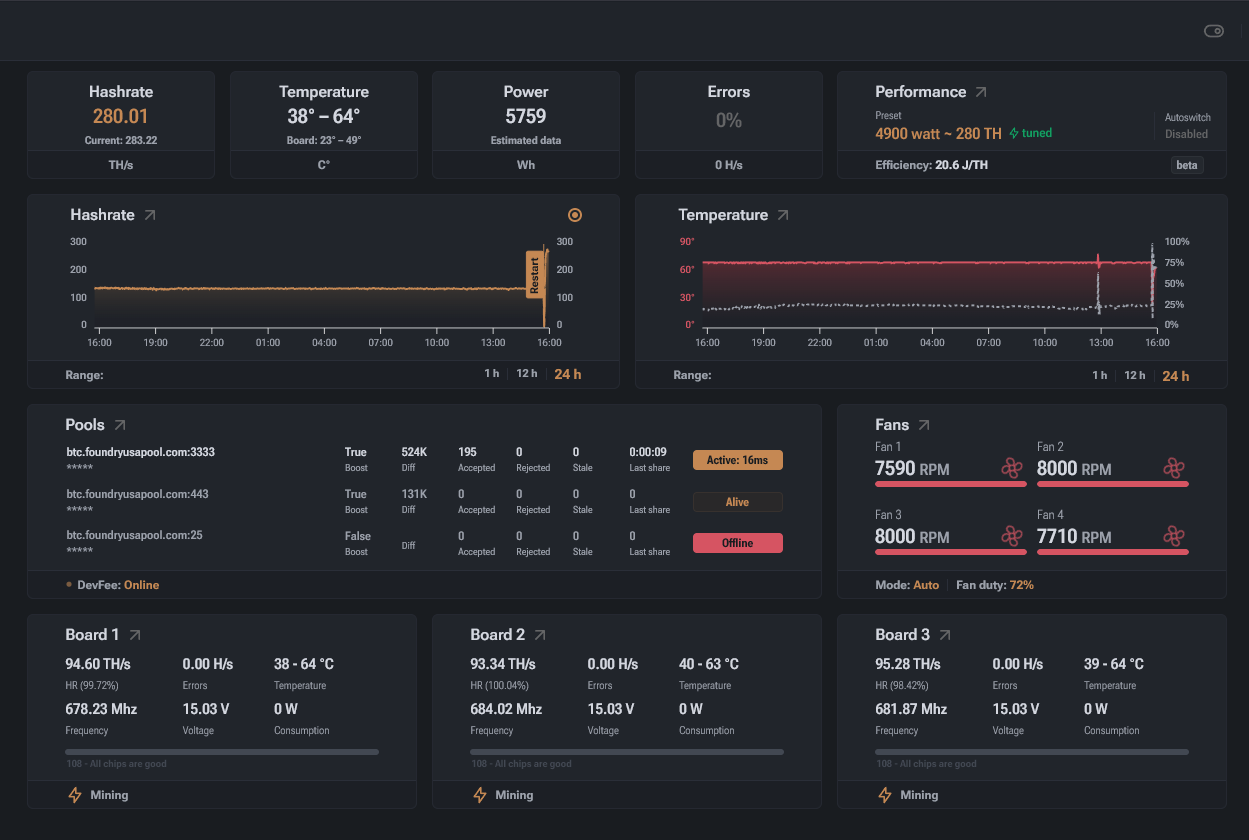
The VNISH firmware features a user-friendly interface designed for efficient miner management. It allows users to monitor performance in real time and log system events, reducing the need for constant on-site supervision and enabling full remote control of mining farms.
This is especially critical for large-scale mining operations where dozens or even hundreds of devices run simultaneously. In such environments, software automation helps minimize operational risks and significantly reduces the impact of human error on overall system stability.
You can do it easily using our utility vnish online updater (VOU)
At the moment, the Vnish Hotel fee function is cut from the functionality of the Vnish firmware, but we can build an analogue for you – a personal version of the Vnish firmware with the inclusion of your pool, worker and percentage.
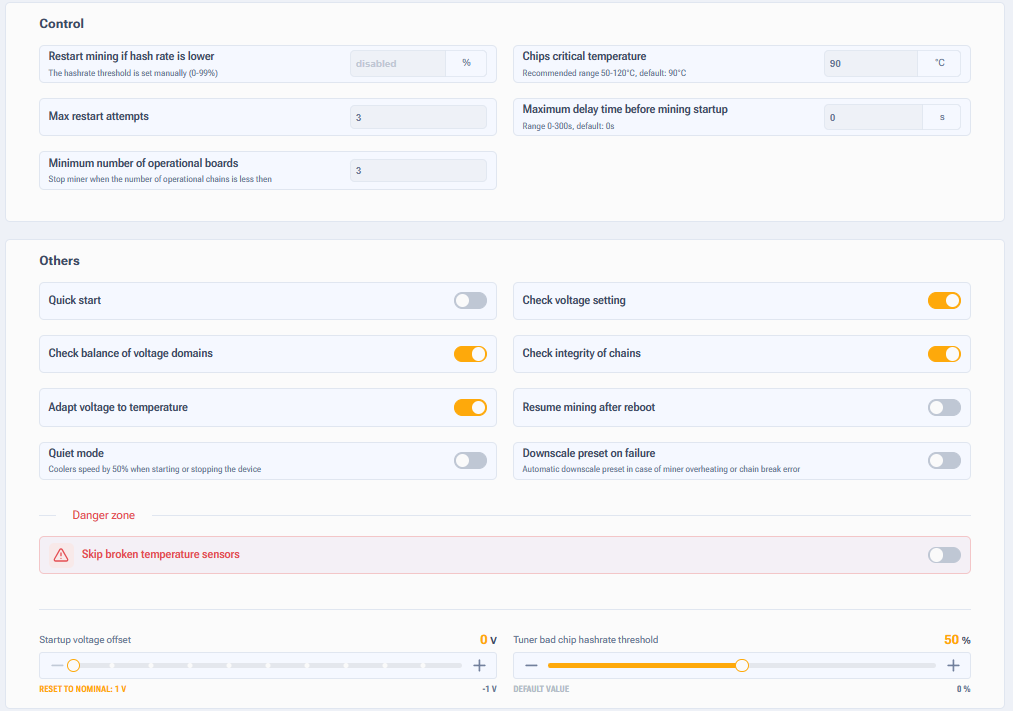
On the first startup, VNISH performs automatic chip tuning. During this process, the firmware tests each individual chip, determines its stable operating frequency and voltage range, and then builds an optimal performance profile. The same procedure is also triggered after applying a new overclocking profile.
At the same time, a fan curve is generated, defining the relationship between fan speed and temperature. As a result, the miner begins operating in a stable state immediately, without overheating or excessive noise.
Autotuning can take up to 6 hours.
Unlock access to the ASIC when prompted for the default Vnish password, enter – admin
You need to check the date of your stock firmware. Then follow these rules:
1) Stock firmware versions on which you CAN install Vnish firmware directly using the Hashcore toolkit: February 2024 and earlier, and from December 2024 to August 2025.
2) Stock firmware versions on which you CANNOT install Vnish firmware via the Hashcore toolkit: Amlogic (A113D) control boards with firmware from September 2025 and newer cannot be flashed using an SD image.
3) If you have BITMAIN firmware installed from March 2024 to December 2024 or from September 2025 and newer (Exception: Amlogic (a113d) control boards with firmware from September 2025 and newer), first you need to install the stock update file up to September 2025. If you cannot find and install the stock update file up to September 2025 by yourself, then you need to use the INSTRUCTIONS for installing the stock SD image for your model and control board type in order to subsequently install the Vnish firmware using the Hashcore toolkit.
In the majority of third-party mining firmware, the process of rolling back to the stock version is very difficult. And it often requires the intervention of specialists with a high level of understanding of the software and hardware of ASIC miners.
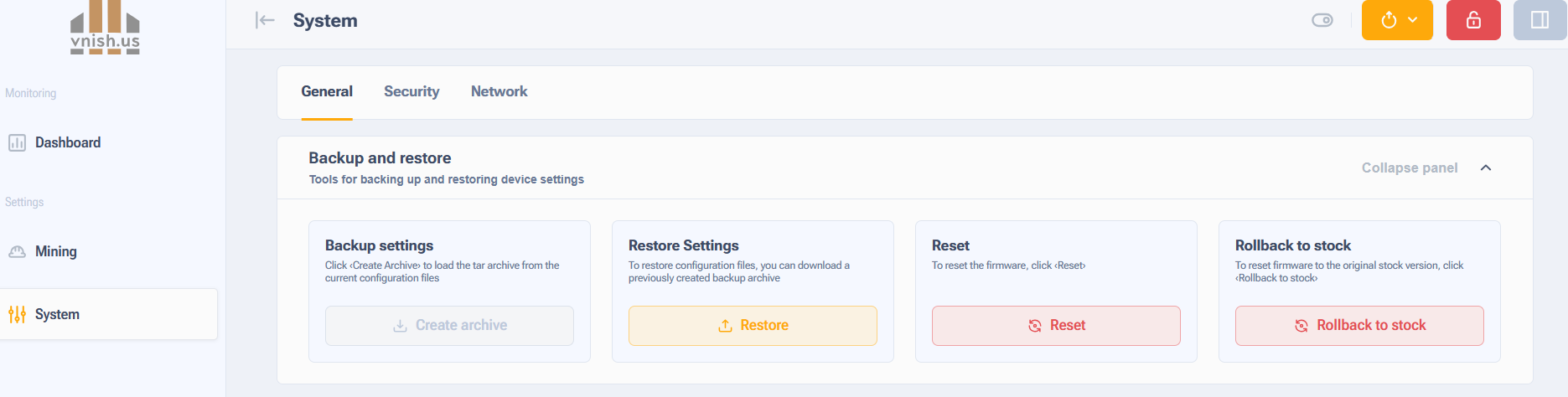
The Vnish firmware has the ability to return to the stock version of the firmware with one click directly from the miner menu in the backup and restore section there is a button to return to stock.
The service life of the equipment when using the VNish firmware is not reduced; it is affected by operating conditions such as temperature, power supply stability and timely maintenance. The warranty is preserved, since when returning to the standard firmware, there are no traces of Vnish left.
You can also use this guide to revert to the stock firmware — Instructions for installing stock firmware using recovery SD images.
Dev Fee (developer fee) - percentage of the miners hashrate which is redirected to developers pool.
21, 19 series - 2.8% , L9, L7 series - 2%
Do you have more than 1000 ASICs? Get a DEV FEE discount!
Mining is a business where precise calculations define success. Even small changes in W/TH efficiency or electricity rates can dramatically impact overall profitability.
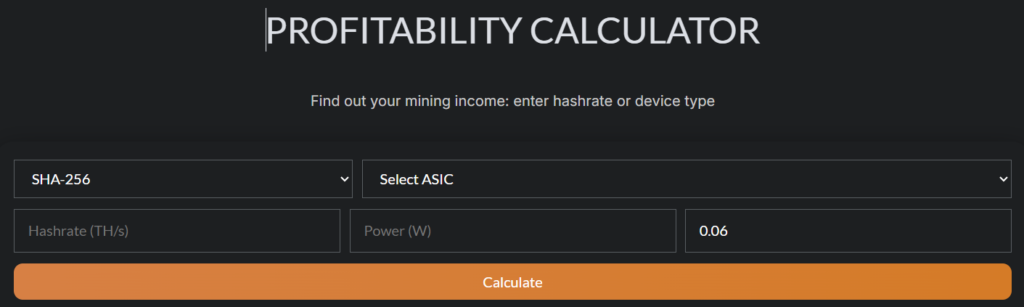
The ASIC profitability calculator allows users to quickly evaluate how profitable their equipment will be under different conditions. By entering three key parameters—hashrate, power consumption, and local electricity cost per kilowatt-hour—the system instantly calculates estimated revenue, electricity expenses, and net profit. Results are displayed in a clear format for one day, one week, and one month, helping users assess both short-term and long-term profitability.
You can view the full documentation in the firmware by opening in the address bar http://miner_IP_address/docs or use this link
VNISH firmware supports the most popular Antminer models.
For Example:
Antminer S21 is considered the most efficient miner of its generation. Even with default settings, it delivers excellent energy efficiency, but VNISH enables users to further reduce operating costs or boost performance depending on their goals and operating conditions.
Antminer S19 is the base model of the series, built on 7 nm chips. In its stock configuration, it operates reliably but with relatively high power consumption. With VNISH, this model can be optimized for better energy efficiency or overclocked to achieve higher performance.
Antminer S19j Pro offers an improved balance between hashrate and power efficiency. Using VNISH enhances stability and allows users to either gain a noticeable hashrate increase or significantly reduce power usage in energy-saving mode.
Antminer S19XP is based on more advanced 5 nm chips that already provide strong efficiency out of the box. After optimization with VNISH, this model can become even more power-efficient or reach higher performance levels when overclocked.
In addition, VNISH supports several other models such as Antminer L7 and Antminer L9, which operate on the Scrypt algorithm. Here as well, the impact is significant—users can achieve 10–15% power savings or gain additional megahashes.
Impact by Chip Class:
5 nm chips (S21, S19XP): improved stability and more precise tuning enable even greater optimization results.
7 nm chips (S19): optimization primarily focuses on reducing W/TH
Scrypt models (L7, L9):temperature control is especially critical, as these miners generate more heat.
When using vnish firmware, the service life is not reduced, the service life is affected by farm conditions (temperature, power stability, timely maintenance). The warranty is not canceled, since the firmware does not leave any traces when returning to the stock
You can view the operating modes at the following links : X21 series, X19 series, L9/L7 series
Vnish firmware already includes ready-made and thoroughly tested profiles for each miner model. These profiles balance hashrate and power consumption, allowing users to quickly select the optimal operating mode. Users can choose a profile based on actual conditions:
When stability and long-term operation of the equipment are critical, a balanced mode can be used;
In regions with high electricity tariffs, it is advisable to use an energy-efficient profile with minimal W/TH;
For achieving maximum performance over a short period of time, profiles with increased computing power are available.
These settings help take into account ambient air temperature, ventilation conditions, power grid capacity, and even the wear of individual miner components. This makes it possible to adapt the equipment to specific conditions without unnecessary risks or complex manual tuning.
We offer additional discounts for large miners, contact us and we will reach the best terms.
1. What Is It?
The auto-profile switching feature automatically adjusts your mining equipment’s settings based on current cooling conditions. This ensures optimal performance and stability while reducing the need for manual intervention.
2. How It Works
The system monitors the equipment’s temperature and automatically switches between hash rate profiles to prevent overheating. You can define a range that sets both the minimum and maximum limits, beyond which the device will not operate.
3. Key Benefits
Enhanced performance
Lower power consumption
Increased equipment lifespan
By maintaining consistent operating temperatures, this function helps prevent overheating and reduces component wear.
4. Setup Instructions
Step 1: Enable the Feature
Open the equipment settings menu
Navigate to the Performance tab
Activate the Auto-profile switching option
Step 2: Select Your Profiles
Configure the default (starting) profile. This will also serve as the fallback in case of rising temperatures. In critical situations, performance may drop below this level.
Step 3: Set the Upper Limit
Choose the maximum profile level that the system should not exceed. This prevents overloading and maintains stable operation.
5. Recommended Settings by Model
S21/T21
Target Temp: 70 °C
Critical Temp: 85 °C
Min Fan Speed: 10%
Profile Boost: 71 °C
Profile Down: 76 °C
S19 (76 and 114 chips)
Target Temp: 75 °C
Critical Temp: 87 °C
Min Fan Speed: 10%
Profile Boost: 76 °C
Profile Down: 81 °C
S19 (77, 88, 110, 120, 126 chips)
Target Temp: 67 °C
Critical Temp: 82 °C
Min Fan Speed: 10%
Profile Boost: 68 °C
Profile Down: 73 °C
L9/L7
Target Temp: 73 °C
Critical Temp: 88 °C
Min Fan Speed: 10%
Profile Boost: 74 °C
Profile Down: 79 °C
ASIC Hydro (Factory Configuration)
Target Board Temp: Up to 65 °C
Profile Boost: 67 °C
Profile Down: 72 °C
Max Profile Limit: Set the highest allowed performance profile
6. Recommendations
Regular Monitoring: Periodically review and adjust profile settings to match current operating conditions and performance goals.
Effective Cooling: Ensure your cooling systems are functioning properly to prevent thermal stress on the hardware.
The auto-profile switching function streamlines the operation of mining equipment, promoting stability and efficiency. By tailoring settings for each model and setting an upper profile limit, you gain better control over performance while protecting your hardware.
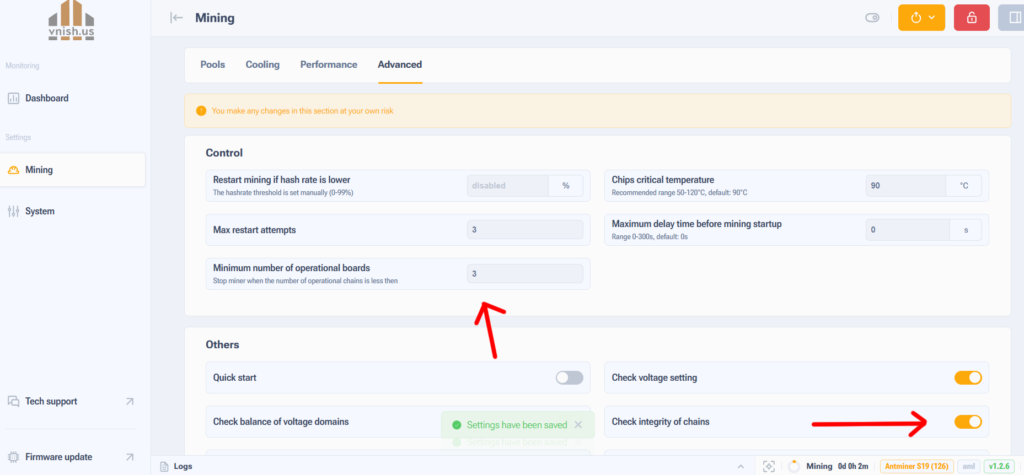
It is necessary to:
1. Disable the board in the advanced settings section.
2. Set the working number of chains in advanced settings.
3. Disconnect the ribbon cable from the board, preferably place a dielectric spacer between the bus and the board (isolate it).
Replace the ribbon cable on the faulty board — if this does not help, send it for repair.
The stability of ASIC miners has a direct impact on daily revenue. Even if hardware shows high performance in theory, real-world losses caused by defects, instability, and downtime can be substantial.
Throttling
Throttling occurs when temperatures reach critical levels. In these situations, the miner automatically reduces operating frequencies to prevent hardware damage. As a result, performance drops and profitability declines.
VNISH prevents throttling by maintaining stable miner operation even under heavy workloads. The firmware intelligently manages frequencies and fan behavior to keep temperatures within optimal limits without sacrificing performance.
As a result, miner owners benefit from reliable, safe operation with minimal downtime and no overheating. On large-scale farms, even a 1% improvement in stability can translate into savings of tens of thousands of dollars per year.